
Instagram auto reply message examples you can copy and paste
The classic auto reply says "Thanks for contacting us, we'll be in touch soon." The customer already knew that. Below are 30 replies that say something useful, grouped by the moment you'd send them. Paste one, swap the brackets, read it out loud, and fix anything you wouldn't say to a person standing in your shop.
Updated
What a good auto reply does
It answers first. If someone asks what time you close, the first words they see should be the time.
Here's the same message written two ways. Someone DMs a cafe at 5:40pm asking if they're still open.
The usual version
Thank you for contacting us. A member of our team will respond to your inquiry as soon as possible.
The useful version
Hi! We're open until 6pm today, so you've got about 20 minutes. Want to see the menu?
The second one is short and has the answer, a little warmth and a next step. The first one has none of those.
A few habits that hold up across every example below. Keep it to one or two sentences. Use your business name once, so people know they reached the right place. Write the way you write your captions. And if someone sincerely asks whether they're talking to a person, tell them the truth. It costs you nothing, and people tend to forgive a bot far more easily than a fake human.
Before you paste anything
Every example uses [square brackets] for the parts that are yours. Fill in real details, and check them again whenever something changes. An auto reply that quotes last winter's hours does more damage than having no auto reply, because the customer turns up and you're shut.
Also read each one as the customer. Does it make them do extra work? "Tell us what you need" is fine. "Please fill in the following details" is a form, and people don't fill in forms in DMs.
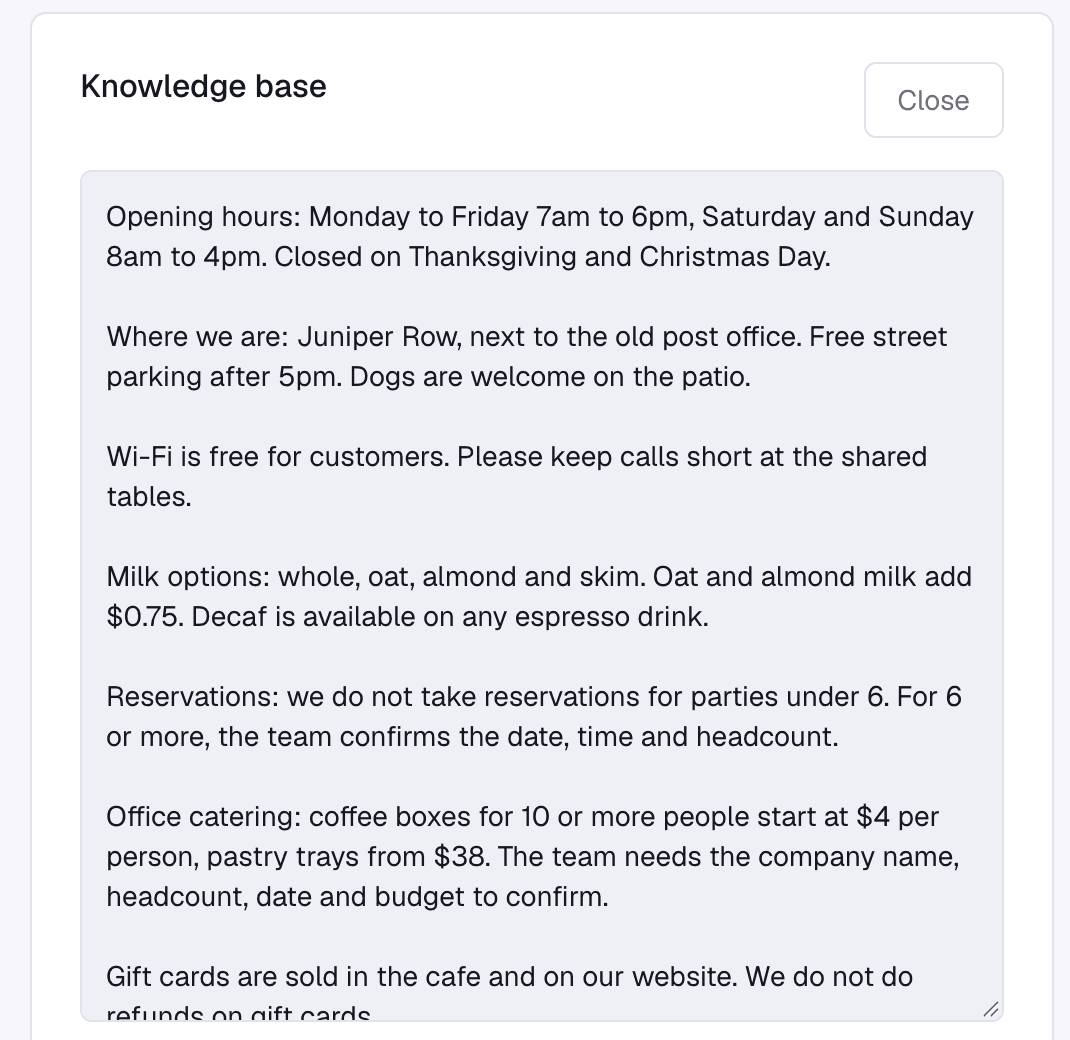
If you'll be pasting the same hours, prices and policies into several replies, write them down once somewhere you can update. Here's what that looks like in Tawlki: plain sentences, one topic per paragraph, no special format.
Greeting and first reply
The first message sets the tone, so keep it light and give people somewhere to go.
Simple welcome
Hi! Thanks for messaging [Business]. How can we help you today?
Welcome with a next step
Hi, and welcome to [Business]! Tell us what you're looking for and we'll point you the right way.
Returning customer
Welcome back to [Business]! Great to hear from you again. What can we do for you today?
Welcome with options
Thanks for getting in touch with [Business]. Ask us about prices, opening hours or bookings and we'll help right away.
Opening hours and location
These are the questions you answer fifty times a week. Say them once, properly, and let the reply do the repeating.
Hours
We're open [days] from [time] to [time]. We'd love to see you!
Hours and address
You can find us at [address]. We're open [days], [time] to [time].
Holiday hours
Our hours are different this week: [dates and times]. We're back to normal from [date].
Away and after-hours messages
Only promise a reply time you can keep. "First thing tomorrow" works if you really do open the inbox first thing. If you don't, say "within a day" and beat it.
Out of hours
Thanks for your message! We're closed right now and open again at [time]. We'll reply as soon as we're back.
Busy period
We're very busy at the moment, so replies are taking a little longer than usual. We'll get back to you today.
Closed for the day
Thank you for contacting [Business]. We've finished for the day and will reply first thing tomorrow.
Prices and services
Give the number. Many people who ask about price and get "contact us for a quote" go and ask somebody else.
Price question
[Service] is [price] and takes about [time]. Would you like to book it?
Price list
Here's our price list. If something isn't listed, tell us what you need and we'll help.
Discount code
Here's your [X]% code: [CODE]. It's valid until [date].
Custom quote
The price depends on what you need. Tell us a little about it and we'll send you a quote.
Bookings and appointments
Offering times
We have [time] and [time] free on [day]. Which suits you?
Booking confirmed
You're booked in for [day] at [time]. We've sent the details to [email]. See you then!
Rescheduling
No problem. Tell us a time that works better and we'll move your booking.
Offering two specific times beats "when are you free?" every time. One question, two options, and the customer can answer with a single word.
Orders, delivery and returns
These are the messages where a customer is already a bit worried, so lead with the fact and keep the apology short.
Delivery times
We deliver within [area] in [days]. Delivery is [price or free over amount].
Order status
Thanks for asking! Send us your order number and we'll check where it's.
Returns
You can return items within [days] if they're unused. Message us your order number and we'll help.
Shipping delay
Your order is taking a little longer than planned. It should reach you by [date], and we're sorry for the wait.
Out of stock
That item is out of stock right now. Tell us your size and we'll message you when it's back.
Replies to comments
Two messages work together here. A short public reply under the comment, then a DM with the actual thing. Keep the public one tiny, because everyone can read it.
Public reply to a keyword comment
Thanks for asking! We've sent you the details in a DM.
Public thank you
Thank you so much! We're glad you like it.
Offer by comment
Comment [WORD] and we'll send you the [offer] in your DMs.
Thank you and follow up
After a purchase
Thank you for your order! If anything isn't right, message us and we'll fix it.
Review request
Thanks for choosing [Business]! If you enjoyed it, we'd love a review: [link].
After a visit
Thanks for visiting [Business]! We'd love to see you again soon.
Collecting contact details
Ask for one thing, and say why. People hand over an email when they can see what they get for it.
Asking for an email
Want the [guide or offer]? Share your email and we'll send it over right here.
Asking for a phone number
Happy to help with that. What's the best number to reach you on?
What these look like in a real inbox
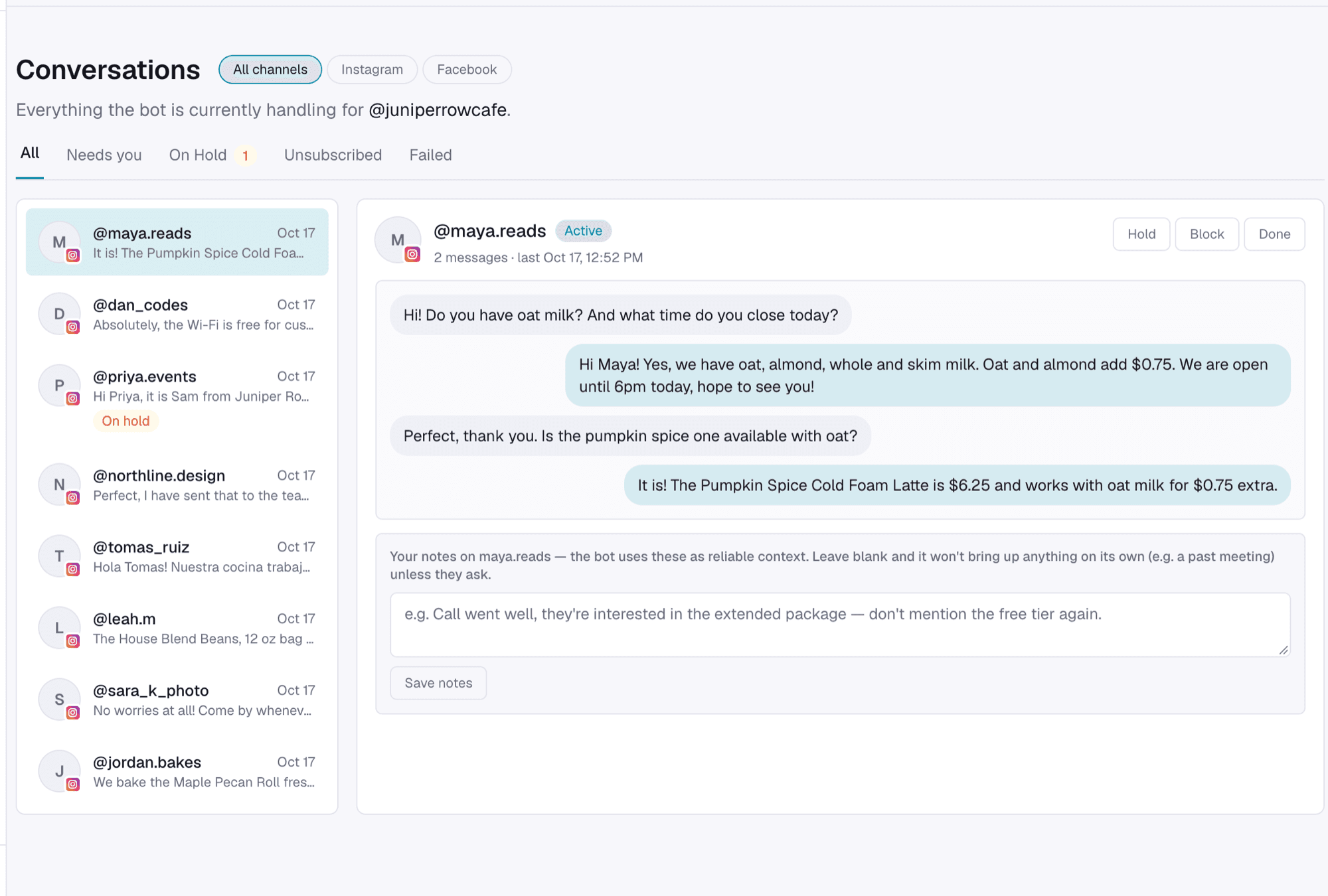
Templates only get you so far, because real customers ask two things in one message. Here a customer wants to know about oat milk and closing time in a single DM, and the reply handles both.
That's the gap with fixed replies, which we get to next.
Where Instagram's built-in auto replies stop
Instagram lets business and creator accounts add up to four frequently asked questions to chats, each with an automated answer. Meta Business Suite also offers an instant reply to a first message and an away message for when you're unavailable.
Both send the same text to everyone. They can't answer a question you never wrote a reply for, book an appointment or collect a lead. If you get the same four questions all day, they're enough. If your customers ask a hundred different things, an assistant like Tawlki reads each question and answers from your own prices, hours and policies, and steps aside when you reply yourself.
Common questions
Can I set up an auto reply on Instagram?
Yes, with a business or creator account. Instagram offers frequently asked questions in chats, and Meta Business Suite offers an instant reply and an away message. For answers that depend on the customer's question, you need an assistant such as Tawlki.
What should an Instagram auto reply say?
Answer the question if you can, say what happens next, and keep it to one or two sentences. Include your hours or when you'll reply.
How do I write an away message for Instagram?
Say you're away, when you'll be back and what the customer can do in the meantime. The after-hours examples above show three versions.
Should an auto reply say it's automated?
If someone sincerely asks, yes. Meta's policy also says that where the law requires it, automated chats must disclose that the person is talking to an automated service.
Are auto replies allowed on Instagram?
Yes, when they run through Instagram's official tools and reply to people who contacted you. Automation that logs into your account with your password is a different matter, and we'd stay away from it.